Kotlin Multiplatform Gets a Streamlined Project Structure: Q&A
JetBrains has rolled out a new default project structure for Kotlin Multiplatform (KMP) projects, aimed at simplifying module responsibilities, aligning with industry conventions, and complying with Android Gradle Plugin 9.0 requirements. This overhaul replaces the previous monolithic composeApp module with a cleaner separation: a dedicated shared library module plus individual application modules for each target platform (e.g., androidApp, desktopApp, webApp). The changes are already live in the KMP wizard, IDE plugin, and official samples. Below, we answer key questions about what’s changing, why, and how to adapt.
What is the new default project structure for Kotlin Multiplatform?
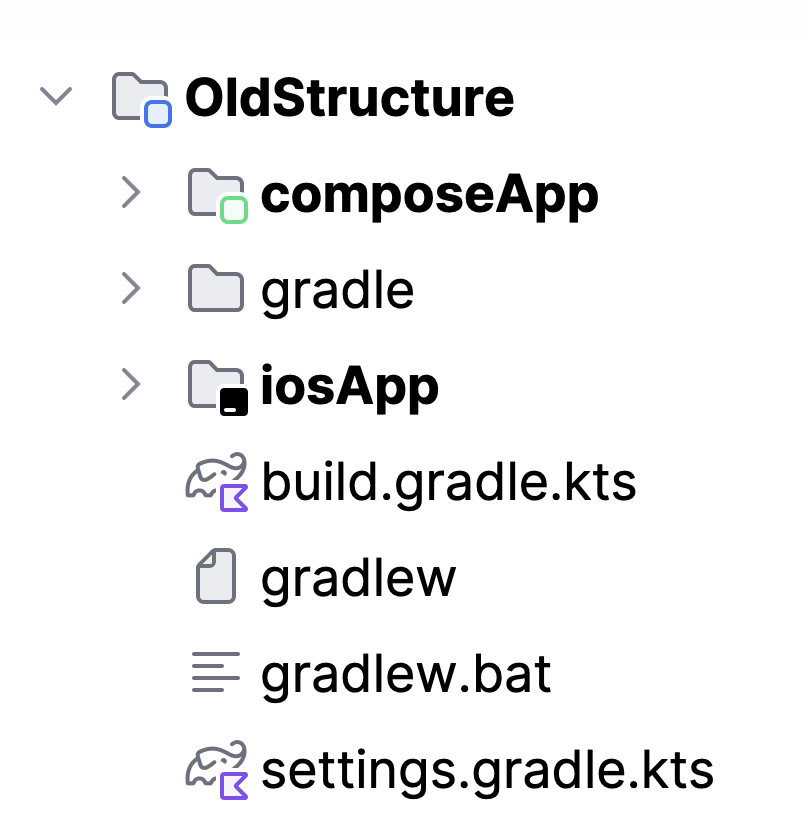
The new structure introduces a shared module that is a pure Kotlin Multiplatform library containing all cross‑platform code. Then, for each platform where you want a runnable application, you create separate application modules like androidApp, desktopApp, and webApp. This replaces the old approach where a single composeApp module tried to act as both the shared library and the application entry point for multiple platforms. Now responsibilities are crystal clear: the shared module handles business logic and shared UI (if using Compose Multiplatform), while each app module manages platform‑specific configuration, entry points, and packaging.

Why is JetBrains changing the default project structure?
The primary motivation is to give each module a single, clear responsibility. The old composeApp module mixed library code with application configuration for all platforms, making it hard to distinguish between shared logic and platform‑specific setup. Additionally, if a developer chose not to share UI (e.g., using SwiftUI on iOS), the old structure required adding a separate shared module, causing inconsistency. Another asymmetry was that iOS apps already lived in a separate iosApp folder, while other apps were bundled inside composeApp. Finally, Android Gradle Plugin 9.0 mandates that the Android application entry point must be in a module separate from the multiplatform library—a requirement the old structure could not satisfy. The new structure resolves all these issues.
How does Android Gradle Plugin 9.0 influence this change?
Android Gradle Plugin 9.0 (AGP 9.0) no longer allows applying the Android application Gradle plugin in a multiplatform module. Since the old composeApp module contained both the shared library (multiplatform) and the Android application configuration, it became incompatible with AGP 9.0. The new structure solves this by moving the Android application into a dedicated androidApp module, which applies the Android application plugin separately from the shared module that applies the Kotlin Multiplatform library plugin. This change not only ensures compatibility but also reduces confusion between library and application responsibilities. Developers should update to IntelliJ IDEA 2026.1.2 or newer and use the latest Android plugin to get full support for AGP 9.0.
What modules are included in the new project structure?
The default new structure consists of one shared module and multiple application modules as needed. The shared module is a Kotlin Multiplatform library containing all code that can be reused across platforms, including business logic, data handling, and (optionally) Compose Multiplatform UI. For each target platform where you want a standalone application, you add a dedicated module: androidApp for Android (using a standard Gradle application plugin), desktopApp for desktop (e.g., JVM), and webApp for web (e.g., Kotlin/JS). The iOS application continues to be an Xcode project (iosApp folder) that consumes the shared library, but now it sits alongside the other app modules rather than being the only separate one. This uniformity makes the project layout predictable and easier to navigate.
How can developers update existing projects to the new structure?
To migrate an existing KMP project, start by creating a new shared module and moving all cross‑platform source code (commonMain, etc.) from the old composeApp into it. Then, for each platform, create a corresponding app module (e.g., androidApp) that depends on the shared module and contains only platform‑specific entry points and configuration (such as AndroidManifest.xml for Android, main.kt for desktop, etc.). Adjust your Gradle build scripts: apply the Android application plugin only in the androidApp module, and keep the multiplatform plugin in the shared module. Finally, update any references in your IDE run configurations and CI scripts to point to the new modules. JetBrains provides sample projects like kotlinconf-app and KMP-App-Template to demonstrate the transition.
Where can developers see the new structure in action?
The new project structure is already implemented in the official KMP wizard, available both inside IntelliJ IDEA (with the Kotlin Multiplatform plugin installed) and at kmp.jetbrains.com. When you create a new KMP project using these tools, you will automatically get the shared + app modules layout. Additionally, JetBrains is updating its sample projects to match the new structure. You can preview the changes in repositories such as kotlinconf-app, KMP-App-Template, and RSS Reader. These samples serve as reference implementations showing how to organize code, manage dependencies, and build for multiple platforms using the streamlined module architecture.